![[SC] Chatbox](/data/resource_icons/0/956.jpg?1787620357)
Download high-quality albums and mixes with seamless transitions, curated tracks, and flawless sound — perfect for DJs and music lovers.
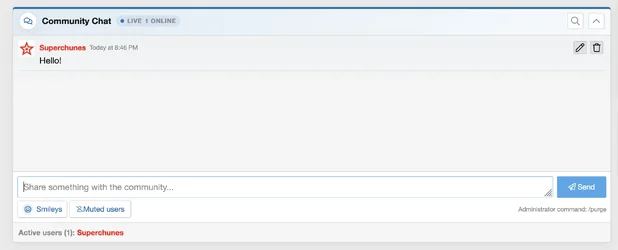
[SC] Chatbox is a modern, responsive live chat system that seamlessly integrates with your XenForo community. Members can communicate without leaving the current page, receive mention alerts, see who is actively using the chatbox and interact through a clean interface designed for both light and dark styles.
The chatbox is installed as a standard XenForo widget, allowing it to be placed anywhere your style supports widget positions.
FEATURE HIGHLIGHTS
- Live AJAX message updates without refreshing the page
- Responsive, theme-aware design
- Compatible with light and dark XenForo styles
- Configurable chatbox height and message limit
- Adjustable automatic refresh interval
- Polling pauses when the browser tab is hidden or the chatbox is collapsed
- Collapsible chatbox with the member’s preference remembered
ACTIVE USERS AND ONLINE INFORMATION
- Displays members currently using the chatbox
- Active usernames are clickable
- Usernames retain their XenForo usergroup colors
- Displays the number of recently active signed-in members
- Configurable online activity window
- Active-user list can be enabled or disabled by administrators
MENTIONS AND ALERTS
- @username mention support
- Username autocomplete while typing
- Mentioned usernames are highlighted inside messages
- Mentioned members receive a standard XenForo bell notification
- Mention alerts respect muted-user settings
MESSAGE FEATURES
- User avatars
- Message timestamps
- Quick smiley picker
- Automatic clickable URL conversion
- Optional YouTube video previews
- Optional previews for directly linked JPG, PNG, GIF and WebP images
- Chat history search
- Configurable maximum message length
- Configurable posting cooldown
- Optional automatic cleanup of older messages
MEMBER CONTROLS
- Edit recently posted messages
- Configurable message-editing time limit
- Delete own messages
- Mute individual chatbox users
- Manage and unmute previously muted users
- Messages from muted users are automatically hidden
ADMINISTRATOR AND MODERATOR TOOLS
- Separate permissions for viewing and posting
- Permission to use the smiley picker
- Permission to edit own messages
- Permission to delete own messages
- Permission to delete any message
- Permission to purge the entire chat
- Administrator /purge command with confirmation
- Optional administrator announcement
- Link-domain allowlist and blocklist controls
- Enable or disable media previews
- Enable or disable chat history search
- Enable or disable mention alerts
- Enable or disable user muting
- Enable or disable message editing
- Enable or disable the active-user list
- Global configuration through the XenForo options panel
PINNED COMMUNITY CONTENT
Administrators can highlight important XenForo content above the chat messages.
- Pin a XenForo thread
- Pin a Resource Manager resource
- Display the newest visible thread from a selected forum or category
- Separate configurable highlight colors for resources, threads and categories
COMPATIBILITY AND REQUIREMENTS
- XenForo 2.3.7 or newer
- XenForo Resource Manager 2.3.0 or newer
- PHP 8.0 or newer
- PHP 8.3 or 8.4 recommended
- MySQL 5.7 or newer
- Compatible MariaDB and Percona database versions
Upload the ZIP archive through:
ACP → Add-ons → Install/upgrade from archive
https://superchunes.com
![[SC] Purchasable Resource](/data/resource_icons/0/955.jpg?1787585381)


